
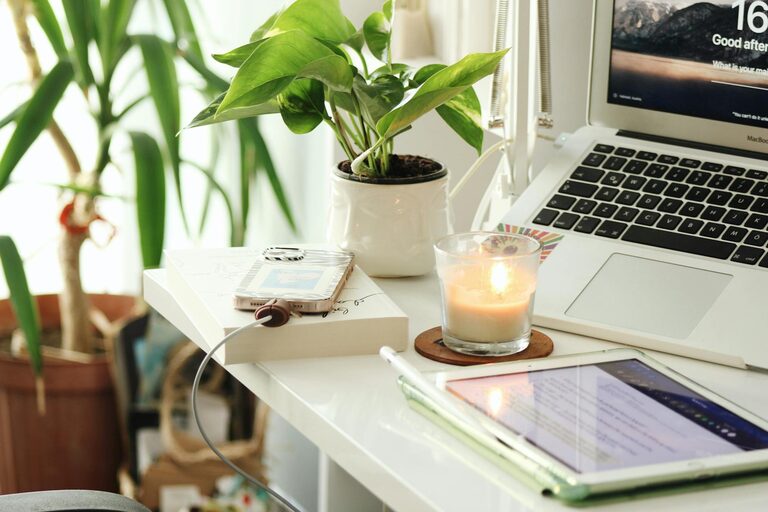
Creating a relaxing home workspace is essential for anyone working remotely or spending extended hours at home. A well-designed workspace not only improves your productivity but also promotes your mental and physical well-being. If your current setup feels cluttered, stressful, or uninspiring, making thoughtful changes can make a significant difference.
In this post, we’ll explore practical tips to create a home workspace that helps you stay focused, comfortable, and motivated throughout your workday.
Why a Relaxing Workspace Matters
Your environment plays a big role in how you think and feel during work. A cluttered or uncomfortable workspace can lead to distractions, fatigue, and even stress. On the other hand, a well-organized, pleasant, and calming space can boost concentration, creativity, and overall job satisfaction.
By designing a workspace that feels inviting and peaceful, you set yourself up for more productive days and better work-life balance.
Choose the Right Location
Prioritize Natural Light
Whenever possible, set up your workspace near a window to take advantage of natural daylight. Exposure to natural light improves mood and alertness and reduces eye strain.
Minimize Distractions
Choose a spot away from high foot traffic, noisy rooms, or televisions. A quiet corner or a dedicated room can help you focus better.
Consider Your Daily Routine
Select a location that complements when and how you work best. For example, if you like to start your day early, a spot with morning sunlight might boost your energy.
Invest in Comfortable and Functional Furniture
Ergonomic Chair and Desk
Comfort is key for long hours of work. Invest in an ergonomic chair with good lumbar support to protect your back. A desk at the right height prevents strain on your neck and wrists.
Adjustable Setup
If possible, use a sit-stand desk to alternate between sitting and standing, promoting better circulation and reducing fatigue.
Adequate Workspace Surface
Make sure your desk has enough space for your computer, notebooks, and other essentials without feeling cramped.
Organize and Declutter
Keep Essentials Within Reach
Use desk organizers, trays, or drawers to store frequently used items like pens, notepads, and chargers. This reduces clutter and saves time.
Use Cable Management
Tidy up cords and cables with clips or sleeves to maintain a neat appearance and prevent tripping hazards.
Regularly Declutter
At the end of each day or week, clear your desk to start fresh. This helps reduce mental distractions and promotes a sense of calm.
Add Personal but Soothing Elements
Incorporate Plants
Indoor plants not only improve air quality but also add a touch of nature, which can reduce stress and increase productivity.
Choose Calming Colors
Soft, neutral colors or gentle pastels on the walls or accessories create a serene atmosphere that helps you concentrate.
Use Inspirational Decor
Display motivational quotes, photos, or artwork that encourage focus and positivity without overwhelming your space.
Control Lighting and Temperature
Adjustable Lighting
Use a combination of natural light, overhead lighting, and task lamps to create balanced and adjustable illumination. Avoid harsh fluorescent lights.
Maintain Comfortable Temperature
Keep your workspace at a comfortable temperature. Dress appropriately and use fans or heaters if needed to stay comfortable.
Manage Noise Levels
Use Noise-Canceling Headphones
If your environment is noisy, noise-canceling headphones can help you stay focused and block distractions.
Play Background Music or White Noise
Some people find that soft music or white noise improves concentration. Choose sounds that are gentle and non-distracting.
Soundproof Your Space
If possible, add rugs, curtains, or wall panels to reduce echoes and noise from outside.
Establish a Routine and Boundaries
Set Work Hours
Define clear start and end times for work to avoid burnout and preserve personal time.
Take Regular Breaks
Incorporate short breaks to stretch, hydrate, or rest your eyes. This refreshes your mind and body.
Communicate Your Workspace Purpose
Let others in your home know when you are working and ask for quiet during important tasks or calls.
Use Technology Wisely
Streamline Your Tools
Use reliable software and apps that help you organize tasks, communicate effectively, and reduce time-wasting.
Limit Digital Distractions
Turn off unnecessary notifications or use apps that block distracting websites during work hours.
Ensure Good Connectivity
A stable internet connection prevents frustration and interruptions during work.
Final Thoughts
Creating a relaxing home workspace is about balancing functionality with comfort and personal style. By making intentional choices about your location, furniture, organization, and atmosphere, you can build a space that supports both your productivity and well-being.
Remember, small changes can lead to lasting improvements in how you work and feel each day. Take the time to customize your environment, and you may find that your motivation and focus naturally increase—making your work-from-home experience much more enjoyable.